



The only thing more annoying than the hunt for free stock photos is how vanilla they can be. They’re meant to be a ‘one size fits all’ visual resource, and while that sounds great in theory, it’s far from reality.
There’s one critical element of visual content that’s not taken into account in this train of thought.
Style!
Take jeans for example. How many of us wear the same kind of jeans, let alone the same way?
You’ve got…
- The skin tight, wiggle yourself in them fit
- The hip hop, 4 sizes too big, sag off your ass fit
- The form fitting country crooner fit
- The high rise, pleated mom fit
You get the point.
One person’s perfect fit is another person’s fashion nightmare. Our preferred styles of jean, the way we wear them, and the items we pair with them is dictated by our personal style.
Versatility is one of the reasons jeans have remained a wardrobe staple for decades now. They’re a staple that bridges cultures, body types and social classes, but they certainly aren’t a one size fits all kind of thing – something any parent who has tried to buy jeans for their teenager knows all too well.
Stock photos are the jeans of visual content. Using any ole stock photo is one thing, seamlessly branding that stock photo so it blends with YOUR brand’s look and style is a whole other.
Here are 6 ways you can take the ‘stock’ out of stock photos and make them your own…
 CROPPING DOWN AN IMAGE
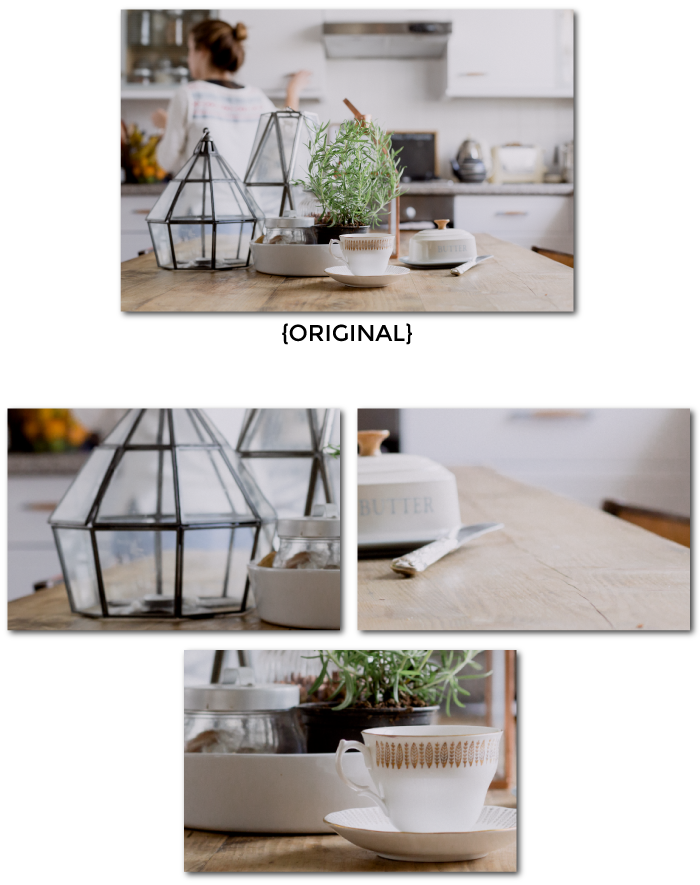
One of the great things about stock photos is that they usually come in very large sizes, which makes cropping them down for your images a great strategy.
When you’re looking at photographs to use for your blog images, don’t restrict yourself to the original image. There are several different ways you can crop stock photos to change the look of them.
The trick to branding stock photography by cropping them down is focusing on the four corners of the photo. In other words, create your cropping parameters by working from one of the corners out, making sure to maintain the aspect ratio .
Then, move the cropping box up, down, left or right to play with the balance within the new parameters.
It’s a lot like looking through the lens of a camera. You’ve got a large area as a whole, but the lens will only capture a small portion. Just as you would move the lens around to capture the portion of the scene you want, you will need to move the cropping box around your photo until you get the desired crop you want.
To help you visualize this technique here are couple examples of how you can change the feel of a photograph by cropping it down.


 USING COLOR OVERLAYS
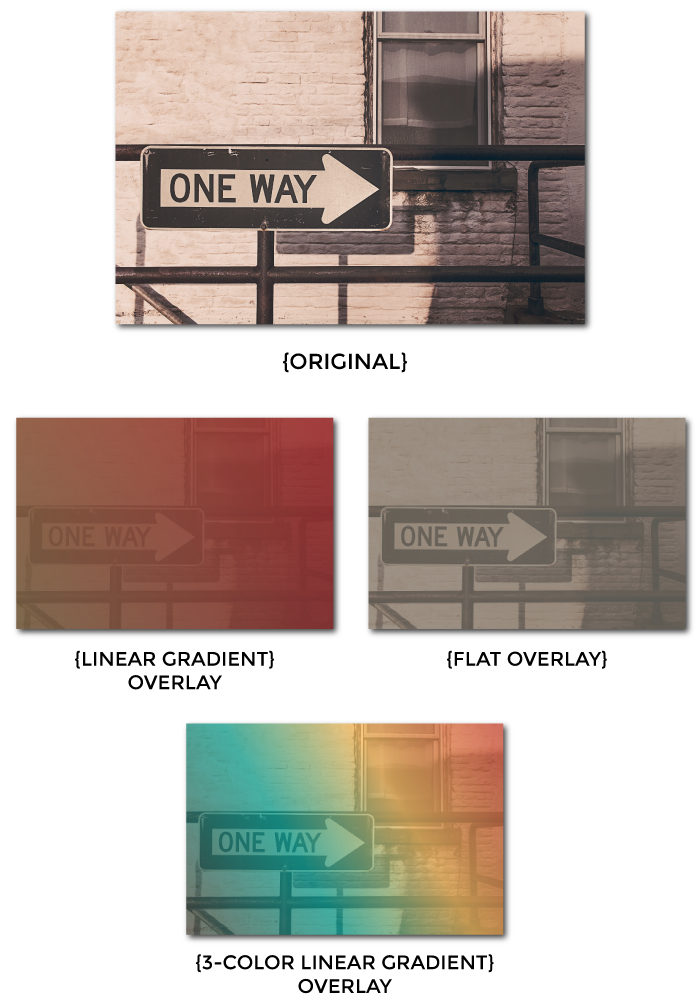
Another way to change the look of a stock photo is to use a color overlay, which is a fancy way of saying a semi transparent layer that lays over a photograph.
Adding color overlays is a great way to infuse your brand colors into your stock photography, which will really change the look and feel of your images.
The 3 most commonly used types of color overlays are flat, radial gradient, and linear gradient.
Here are a few different ways to use these 3 types of overlays to transform your stock photography and infuse your brand color palette.
Note: All of the overlays used in the following examples have a 70% transparency.


DEFINE AND USE A SPECIFIC FILTER
Filters used to only be available to photographers with expensive software, but not anymore!
These are the days of Instagram and tons of free photo filtering apps (desktop & mobile), which makes this an easy technique to employ.
The two most important things to remember when branding stock photography using filters are…
Use your chosen filter consistently
Using your chosen filter across ALL of your images will unify your visual content and foster some serious brand recognition. Remember, it’s your job to create a unicorn grade signature style so people can instantly recognize your content. That can only happen if you’re fiercely consistent in every element you use in your brand identity, including filters.
Choose a filter based on your existing brand style
When choosing a filter to incorporate into your brand identity you need to take into consideration what your desired emotional response is and what complements your overall brand message. For instance, is your brand light-hearted and cheery, urban and raw, or maybe youthful and fresh?
Bottom line: the filter you choose should solidify your brand’s vibe and personality, not detract from it.
Here are a few examples of different filters used on the same 3 stock images. Notice the different emotional response that each filter elicits and how drastically it changes the feel of the photo.
Note: All of the filters used in the following examples came from Photogramio.

 ADD OVERLAY FILTERS
Many photo filtering apps offer overlay filters in addition to their regular photography filters, but it’s important to understand that the two are different.
The most popular types of overlay filters include patterns, shapes, textures, borders.
Using an overlay filter, whether alone OR paired with a photography filter, is a great way to craft a unique look for all stock photos you use in your visuals and on your website.
Here are a few examples of overlay filters using the same images that I already filtered in #3.
I did this because I want you to see, with your own eyes, the power in pairing a regular photography filter with an overlay filter to craft a signature style for the stock photography you use.

 APPLY A BLUR EFFECT
Subtlety is really under-rated in the context of branding stock photography.
For instance, you can drastically change the style and feel of stock photo by simply applying a blurring effect to it.
The blurring technique is particularly effective for images you want to include text on, like blog featured images and quote images, because it lends itself to making the stock photo a secondary element in your image. By taking the crisp details out of a photo the eye is naturally drawn to the text on the image.
Here are a few examples of the blurring technique in action.
Note: All the images in the following examples were blurred using LunaPic.

 COMBINATIONS OF THE ABOVE TECHNIQUES
The real magic in taking the ‘stock’ out of stock photography happens when you use a combination of the above 5 techniques.
Here’s the thing, the more unique your stock photography formula is the more your images are going to stand out online.
The goal for branding any stock photography you use is to make them your own! And the fastest way to do that is to blend the above techniques of photo branding together to create a unicorn of a style.
Here are a few combinations using images from the above techniques. In other words, let’s take what I’ve shown you and bring it all together.
I’ve included the original image as well as the image at each of the different stages of photo manipulation.
3-Color Linear Gradient Overlay And Blur

Cropped, Hagrid Filter, And Bocea Overlay Filter

Amber Filter And Burn Overlay Filter

WRAP UP
Those buttercup, are all kinds of ways to take the ‘stock’ out of stock photography and make them your own!
These 6 branding techniques will transform any stock photography you use from UGH to OOOHHHH, and help create a unicorn grade style people will instantly recognize, so don’t be foolish and not use them.
Like I mentioned at the beginning, no two people wear or accessorize their jeans the same way, which is what fosters our personal style. Well, guess what?
That’s the same type of personalized style you want from your stock photography and all of the elements in your brand identity guidelines for that matter.
Once you have that, brand recognition is right around the corner!
ONE LAST THING before you go (you’re going to la la looooove this)…
GRAB YOUR FREE COPY OF
THE QUICK & DIRTY GUIDE TO BRANDING FOR SOLOPRENEURS

This 25+ page ebook is a bloat free recipe that will help you gather, prepare and assemble ALL six main ingredients you need to create a unique AF brand identity your peeps will love eye guzzling.
PLUS, the entire ebook is loaded with tons of exercises, resources and examples, so you’ll have everything you need to start creating your brand identity TODAY, regardless of where you are in your business.