


Creating shareable images has never been easier for DIYers! With tools like Canva, Pic Monkey and PowerPoint (yep, you heard me right, PowerPoint! Gasp.) creating your own visuals has never been more accessible for non-designers.
In fact, creating shareable images takes less time than brewing up your morning cup of wake up juice Joe, no matter how much design experience you have and or don’t have. BUT, you don’t want just any ole shareable image, you want ones that build brand recognition, and that comes down to a 5-part recipe.
If you make sure your images include each of these ingredients, you WILL have a shareable friendly image.
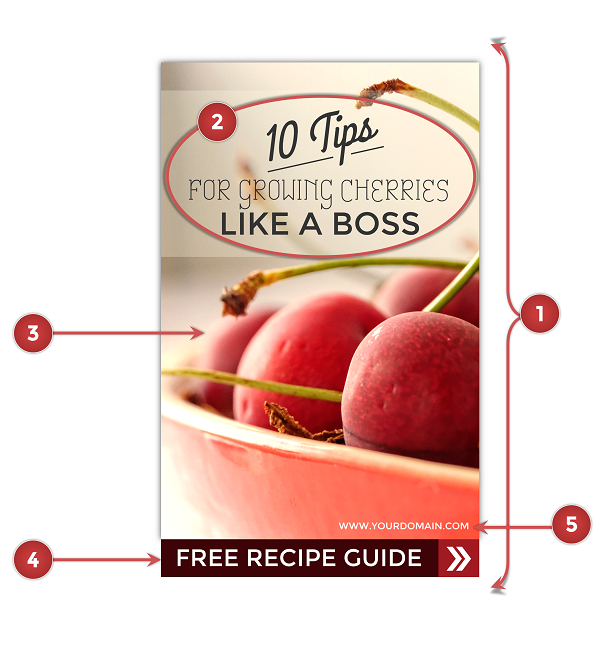
THE 5-PART RECIPE FOR HOW TO CREATE A SHAREABLE IMAGE
- The correct image size for the platform you’re posting it on
- A Catchy Descriptive Title
- A Royalty Free Stock Photograph or A High Resolution Pattern/Graphic
- Strong Call To Action
- Your Logo, Domain or a Branded Watermark
So as you can see, it’s never been easier for a non-designer to create a shareable image. Soooo, what are you waiting for…go get your DIY on, badass!
Use the above shareable image recipe as your checklist when you’re creating new images, so you can watch them get shared and devoured again and again.
Hey Dre,
We definitely don’t have aby excuse not to incorporate images nowadays. Theres so many different tools and resources out there that make it easier for us to implicate images and this is why I’m going to focus more on images for this coming year.
Thanks for sharing and have a great upcoming weekend!
Couldn’t have said it better, Sherman, so I love hearing that’ll be a big focus of yours in 2016. Holler if questions come up! Thanks again for all the love on this post, I really appreciate it, brotha!! ; ) Have a fantastic rest of your year…