


**This is a guest post by Luke Jordan from InterGeek.co.uk**
What’s crackin’ guys and gals?
As Dre BEGGED me on so many occasions to write for The Branded Solopreneur, I figured I’d eventually have to say yes – so here I am.
Note to Dre: if you ever fly over to the UK and turn up at my door demanding guest posts again, I’ll call the police.
I’m under strict instruction to Americanise Americanize this post, so if you see me slip up with an Englishism then please drop me a polite line over at Intergeek, or publicly abuse me on my Twitter – @LJordanOnline.
Right then, why am I here again?
Oh yeah!
Today I’m going to be talking to you about Search Engine Optimization (SEO).
I know, I know – everyone harps on about it, and it’s boring.
I also know that you’ve never seen success from SEO, and that you once read from an expert that you should ignore it completely.
Erm, what kind of crazy mofo would advise you to miss out on the greatest marketing method (in terms of ROI) the world has ever seen?!*
*Don’t quote me on that, but the long-term ROI is seriously f-in high.
Anyway, I realize that you don’t care much for SEO, because you already have 25 hours worth of work to do today and simply will never have time to learn.
However, whilst I’m a firm believer that SEO is a continual process; something that can never be finished and never truly mastered, I’m adamant that you are able to make huge strides towards SEO success in just a single day.
I’m going to let you in on a little secret:
The majority of good SEO isn’t about doing a range of complicated things in order to rank in search.
In fact, it’s much the opposite; it’s all about removing the roadblocks that are preventing you from ranking in search.
Most of these roadblocks are SUPER easy to remove.
Need proof?
Back in February, I gave Dre a few tips to help improve her SEO, all of which are listed in this post – I’ve even thrown in a few bonus tips too.
Being the online wizard that she is, Queen Badass implemented the tips almost immediately.
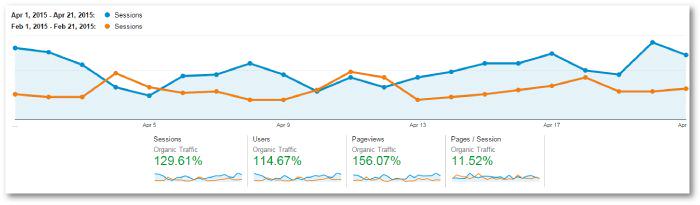
Let’s take a look at her organic traffic for the first three weeks of April, compared to the first three weeks in February – before those changes were rolled out:
Not too shabby, wouldn’t you say?
In just two months, The Branded Solopreneur’s organic traffic rose 129.61%, with an increase in unique organic visitors of 114.67%.
After absolutely killing it on both social media traffic and referral traffic, this site loaded its armory with another huge weapon.
The best news? This is only the start.
If you want to learn how you too can grow your organic search traffic with just a day’s work, then I’ve got the simple SEO tips that you need!
Here are 8 tweaks you can make in one day to propel your organic traffic:
1. INSTALL THE WORDPRESS SEO PLUGIN
 First of all, if you haven’t installed the WordPress Yoast SEO plugin yet – what are you playing at?!
This plugin is every non-SEO’s dream, and it’s even incredibly useful for us that live and breathe Google search.
Didn’t I mention? It’s FREE.
In fact, you won’t have to spend a penny as a result of any of my tips in this whole post.
The WordPress SEO plugin allows you to do a whole load of useful things to help with search:
➽ You’ll be able to create an XML sitemap
➽ You can modify whether your categories and tags are crawlable
➽ You can verify social accounts for additional social exposure
➽ You can install breadcrumbs
There’s a whole load of other things you can do in there too, but I don’t want to bore you anti-SEOs too much.
Chances are, you don’t really understand what an XML sitemap is or whether breadcrumbs are something you see online or something you coat your chicken with.
Good news:
You don’t even need to understand what they are – just know that they’re important.
Simply follow this tutorial from WPBeginner and you’ll be absolutely fine, it couldn’t be easier (and it’s super quick!).
2. UPDATE META TILES & DESCRIPTIONS
 The WordPress Yoast SEO plugin will also allow you to modify your Meta titles and descriptions.
What are these? Don’t worry, I hear ya search rookie.
The Meta title and description is what shows in Google’s search results.
Instead of showing your full page (that’d be silly) they show your title and a brief snippet of text.
By default, Google will grab your blog post headline and a chunk of text from your post to use in its results.
The effect of this?
Truncated headlines and unoptimized descriptions that wouldn’t tempt anyone to click your links.
Need an example? Sure thing:
Let’s say you’ve written a post called “How to Create the Perfect Pinterest Strategies for Small-to-Medium Businesses“.
That’s a pretty good title, it’s highly targeted and I imagine there’s some demand for that type of post (although I haven’t researched that, I’m far too lazy).
The problem?
Here’s how it would look in Google:

The title is WAY too long for Google’s results, meaning some important keywords are missed out.
This gives your post even less visibility and a much lower chance of achieving a click-through, further dropping it in search results.
Once you’ve installed the WordPress Yoast SEO plugin, you’ll now have Meta title and Meta description boxes under each of your posts, meaning you can easily modify and optimize them yourself.
Remember to be sure to include important keywords at the start of your title, and include a strong call-to-action in your description:

As you can see, the title length is now perfect and includes our target keywords at the start, whilst the description includes keywords, useful information and a call-to-action too.
If you need to check out how your Meta information will look in Google, you can make use of Portent’s SERP Preview Tool.
I’d guess that it will take you a maximum of five minutes per post to update your Meta information effectively.
You’ll also notice in that last screenshot that, along with the title and description, I’d also optimized the URL.
3. URL IMPROVEMENTS
 Creating a good URL is absolutely vital for both search visibility and social sharability.
The problem?
What’s great on one medium is very rarely great on the other.
I try to find happy middle grounds, with keyword-optimized URLs that are still brief and easy to share on social media.
The post above had the URL slug ‘/small-business-pinterest-strategies/’ – that’s pretty much perfect, if I do say so myself.
You don’t want your URL to read ‘/the-best-ways-small-and-medium-business-can-improve-their-pinterest…/’ – just no. That’s helping no-one.
An even bigger offence is to have your permalinks set so that your post’s URL comes up as /?p=123 or something similar.
STOP IT RIGHT NOW!
First, go into your WordPress settings, go to ‘Permalinks’ and then click ‘Post name’.
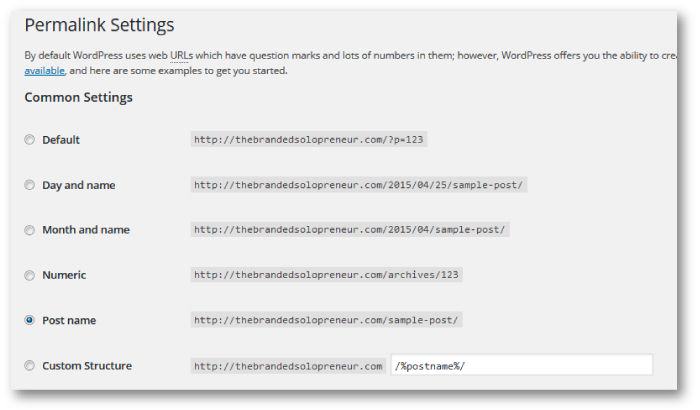
This will help your posts generate better URLs going forward.
To update your old post permalinks, simply click on the ‘edit’ button next to the URL below your post title in WordPress.
IMPORTANT: Don’t go changing your URLs without having the Redirection plugin installed.
This plugin will automatically 301 redirect your old post to the new address whenever you change it.
Using Redirection helps prevent annoying 404 error pages, and also helps to maintain any SEO value your post had developed, and will transfer this value over to the new URL.
4. INCREASE INTERNAL LINKS
 Ever wondered why a post contains a load of links within the text, even though the text seems to flow naturally?
This is the part where you have a brainwave and realize that there have been a load of anchor text links already embedded throughout this post.
These are usually included when an author has a knowledge of SEO, and they’ll be linking to a range of resources that will benefit the reader throughout the post.
Not only will it benefit the reader, but it will also benefit a site’s search rankings.
If you’re frequently linking to other posts on your site – ones that genuinely benefit your reader – you’ll build up the trust signals pointing to your posts.
Trust plays a HUGE factor when it comes to Google deciding where they’re going to rank you.
To balance this out, linking out to high quality external resources – again ones that benefit your reader – can help prove to Google that you’re a trustworthy site.
5. ADD IMAGE ALT TAGS
 If you’re a fan of The Branded Solopreneur, I’m guessing there’s a good chance that you’re a fan of beautiful images.
If you’re using images on your site, you need to make sure you’re adding in ‘alt’ text when prompted.
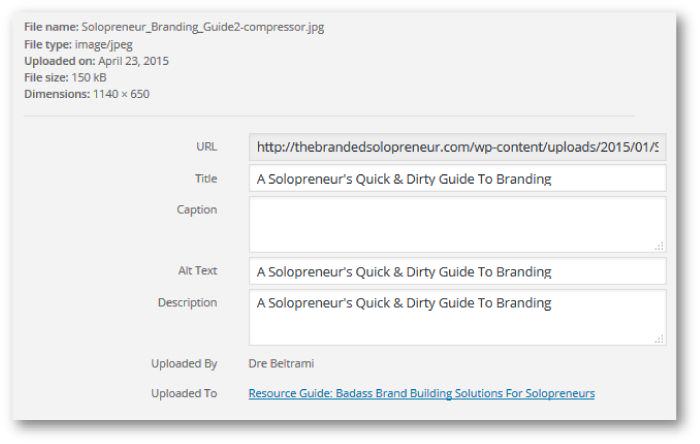
What is alt text?
Well, obviously it’s the thing that WordPress prompts you for when you upload an image, and you never really know what to put in there so you leave it blank, of course.
Okay, not quite:
Google can’t read your images (even if there are words on it).
All it can see is a collection of pixels together, forming a pretty picture.
Without alt text, the image is adding no context for Big G.
If you add alt text, Google can understand exactly what your image is – if of course your alt text is accurate and descriptive.
How do you choose which text to put in here?
It’s easy – just describe the picture in a few words or a short sentence.
Have you included a picture of a cat wearing a tuxedo?
In that case, put your alt text as…’cat wearing a tuxedo‘. It doesn’t take a genius!
This can seem like a real chore of a task, as can a few of the things on this list, but they’re all so worth it.
Adding descriptive alt text can also help drive traffic from Google image search.
6. BOOST SITE SPEED
 With the continuing rise in popularity of mobile browsing, page speed is playing an increasingly crucial role in where a website ranks in Google.
In fact, speed plays such an important role in modern search that Google are even experimenting with ‘slow’ labels in search for sites that aren’t performing well.
No-one will want to click onto a site that has a big, fat, red ‘slow’ label under it.
To solve this you’ll first want to whack your site in Google’s PageSpeed Insights.
In here, you’ll see if there is a possibility of improvement.
If you’ve got a score of 75 or above on both desktop and mobile, I wouldn’t worry too much about making any major changes – this is a good score.
However, anything below that and you’ll want to consider making changes based on the tool’s recommendations:
Need to compress the size of your images? Try the EWWW Image Optimizer plugin.
Need to enable browser caching? Try installing WP Super Cache.
Want to find out which plugins are slowing your site down? Install the P3 Plugin Profiler.
If you want to get a little more complex, you can try installing and setting up a Content Delivery Network (CDN).
If this is a route you want to go down, you’ll definitely need to research CDN’s a little further to find out which one is right for you; they can be expensive.
The aforementioned plugins can all be installed and running within just a few minutes.
After doing this, give it an hour or so and run your site back through the PageSpeed Insights tool to see how much improvement you’ve made.
7. SIMPLE COPYWRITING IMPROVEMENTS
 I’m not talking about adding SEO keywords into your text here (although adding a couple of important keywords into your post can help when used effectively).
Instead, what I’m talking about here is the way you’re writing.
Not just this, but the structure of your content also.
Brian Dean provides an awesome list of copywriting tips on his site, and I also published about How to Keep Readers Glued to Your Content recently, but I’m just gonna leave you one tip here:
Break.
Up.
Your.
Text.
Seriously – white space is your friend.
No-one wants to read huge chunks of blocky paragraphs.
By keeping readers interested and engaged with your content for longer, you’ll start to convince Google that you’re producing higher quality stuff than elsewhere.
With this, they’ll eventually reward you with higher rankings.
You could vastly improve each of your posts using simple copywriting techniques in just 15 minutes per post on your site.
8. GET BACKLINKS FROM EXPERT ROUNDUPS
 Finally, one thing you’ll need to start to do is increase your backlinks from high quality, relevant websites.
Now, whilst you’ll be unlikely to achieve any backlinks in just one day, you’ll definitely be able to put yourself in the position to pick up a high quality link or two in the future by submitting some answers to expert roundups.
Not lucky enough to be asked to participate in these?
Force the issue!
Sign up to MyBlogU and on there you’ll find a load of people seeking answers to be featured in their roundup.
Ensure you login every now and again, or get email notifications, so that you can submit answers to relevant roundups whenever they’re available.
Hey, if my answers get selected on a regular basis then you can bet your bottom dollar that yours will be too.
Yes – This Can Really All Be Done In One Day!
If you need to make better use of SEO, you might benefit from bookmarking this post.
Set a date in the diary (MAKE IT SOON!) and return to this list, work through it one-by-one and smash your blog’s organic traffic out of the park.
I hope you’ve found these simple SEO tips useful, and if you’ve made it this far then you are what I consider to be a modern day hero.
What could you do to improve your site’s SEO?
I’ll be around to respond to answer any questions or feedback in the comments below.

Luke Jordan is the founder of Intergeek.co.uk and crafts posts to help bloggers and websites get more traffic.
Founded in late 2014, Intergeek aims to bring a community of people together that are interested in SEO, blogging and content marketing.
Intergeek’s ‘SEO a twist’ motto defines the website; the site isn’t aiming to be like anyone or anywhere else. We’re putting a fresh angle on things with our modern and informal style whilst providing unique, interesting and actionable tips to improve the fortunes of any blog, website, small business, large business or anything that somehow falls outside of these realms.
The two things that have helped me the most is making sure my website code is properly tagging H1 and H2 headers, as well as doing more in depth research for long tail keywords and trying to rank for non-competitive keywords! Nice post, wish I had this when I first started out!
Yup, those are all super important! Thanks a ton for the love, brotha! *fist bump*
This is exactly what I needed!!! Thank you for this perfection haha.
You’re most welcome! ?
This blog post is such a gold mine! Thank you for sharing, it will definetly help me to take my blog to the next level. ? I’m the most excited about discovering MyBlogU – that site seems awesome, I just created my account, hopefully it will be a real game changer. ?
You’re most welcome!! (fist bump)
Great post and great tips thank you so much!
You’re most welcome, Tina! Holler if you have any question.
Thank you soooo much for this. I’m in the absolute infantile stages of my blog and have found myself saying “I have absolutely no clue what I’m doing” regularly. Thank you for putting this in words I understand. This is honestly probably the most helpful post I’ve read since starting (and I’ve read hundreds.. I’m not exaggerating even a little bit.) so thank you so much. Can’t wait to read more from you both!
Awww, that’s music to my ears, sweetie! That learning curve can be frustrating as hell, so I’m stoked here Luke and I could tame a small amount of that for you. Holler anytime if you have questions, I’m happy to help! Here’s to kicking ass and taking names, you got this girl!!! {fist bump}
Thank you so much for posting this!! Can’t wait to stat implementing some of these strategies. Very helpful tips ?
You’re most welcome…now go GET ER DONE, yo! ?
Hello
Thanks so much for sharing your amazing piece of content.
Yea yea I`m totally agreeing with you, these are really simple and easy seo tips that can be implemented and get better results.
Every website owner should make search engine optimization a part of his entire growth. By using your recommended tools (WORDPRESS SEO PLUGIN and others) and implementing the tips every and each day, surely you will improve your website rank dramatically as well as making more sales.
Thanks a lot,
Omar
They sure can…Thanks a ton for the comment love, Omar!
Oh my, I learned such a lot from this post, I will have to come back to implement your tips. A must share! I like that you ‘scared’ Luke into the post – girl-power Dre!
HAHA, strong armin fools is a specialty of mine. ; ) I la la looove hearing you got so much from Luke’s knowledge. High five to your new SEO badass status, Amanda! You go girl…
Thanks for all those pieces of advice! I use YOAST SEO does a lot with the right configuration. Thanks for letting me know “page speed insights” existence. There are a lot of errors for me to correct ?
Nefeli | http://lovebeinginspired.net
You BET, girl! Here’s to your SEO badass status! ; )
Yoast SEO rocks!
Meta titles and descriptions are essential, as are ALT tags on the images.
I love the “green circle” reference: re Yoast SEO- A full set is the holy grail.
Right?!…I live for those green circles! haha
Thanks a ton for the comment love, Stephen! {fist bump}
Amazing post on SEO Tips, These are the advance and working seo techniques. But If we do in the right way then we can pass the relevant and good traffic to our website. Lot of newbies start the black hat seo techniques to get traffic. But hence, Google penalise their site and their all hardwork is known as Big 0..
Thanks for sharing.
Yup, newbie or not just say NO to the blackhat allure, it’ll screw ya every time. Thanks for the comment love, Harman!
Such a helpful post. Except, HELP ME! When I change the permalink to just post name (because I am a rookie and chose to have post and month when I started) it changes all the old ones and even with the redirection plugin installed and activated it won’t redirect and just comes up with an error.
Any tips/advice? Thank you!!!!!
Stoked to hear it helped you, Luke definitely knows his shit.
Depending on the redirect plugin your have you will likely need to enter in some settings or the redirects to work properly. I would play with your plugin settings and Google some tutorials/troubleshooting about that specific plugin to get things functioning properly. Hope that helps! Get it girl!
This is an easy, simple article. However, it is very useful for very one who wants to step his foot into the Internet marketing filed. Thank you for your article, for me it is great!
You bet, Juan! Thank YOU for the comment love, brotha man.
Really helpful and definitely easy and engaging to read. Thanks for the tips. Now off to take over the world.
GO GET EM, girl!!! ; )
This is such an amazing guide for an SEO noob like me! I can’t wait to start to use all these useful tips and plugins ?
Woooohoooo, Luke knows his SEO so definitely implement these tips….they easily quadrupled my traffic…and we all like that, right?! ; )
Thanks for l the great info! I’m new to your site and have already spent a ton of time here. Do you have any tips for Shopify users?
Hey name twin, BIG ass high five for the love and for poking around my site! I don’t have any posts on Shopify yet, but thanks for the idea! I’ll add that to my to do list and get er done.
Have a KICKASS weekend, sweets!
I’ve enjoyed your post so much! Thank you!
My biggest struggle now is website loading speed. I’ve tried so many plugins..
I did not know about P3 (Plugin Performance Profiler). Amazing! I’ll try it right NOW.
Woooohoooo, that’s epic news, so thank YOU for sharing how helpful this article was for you. Luke is truly a SEO ninja, I’m so glad I could share him with you. Cheers to your increased speed, Anna!… ; )
Came across this post today and just wanted to say cheers Dre and Luke. Dre your branding tips kickass, Luke great advice as ever in easy to understand language.
I really appreciated the plugin suggestions, it’s a trial and error world in WP so it’s nice to find recommended solutions for solving issues like caching, redirects and especially the resource allocations/load times for plugins.
Best
Justin
There’s a BIG ass high five with your name written all over it coming at ya, Justin! I couldn’t agree more, the masses of plugins gives me a headache so anytime I find suggestions from a trusted source I’m overjoyed not to be basking in overwhelm land anymore. I’m so stoked that Luke’s badassery = you stepping up your SEO game. Here’s to your crushing status, brotha!
you rocked my day! I was looking around and happened up on your blog on Pinterest. Love the fact good advice is easy to locate. Many thanks, Doris.
BIG ass high five for the love, Doris! Epic to hear my favorite social addiction is how you found me. ; )
Hey Dre and Luke,
This is my first time on this site and I’m liking the information here even though it’s a guest post. Doesn’t matter since it shows Dre’s keen sense of picking great guests.
Tup #6 really caught my attention. I got a great score on my mobile but not on my desktop. I thought it should’ve been the other way around but it is what it is right?
I definitely appreciate the plugins you shared. One of the problems I had was with my images. I need to compress them and didn’t have a clue as to how to do it until I stumbled on this post.
Thanks for s g a ring the value and I hope you have a great rest of the week!
I know a SEO badass when I see one…so I couldn’t help but strong arm Luke into the guest post. I’m stoked to hear it’s provided some much needed solutions for you too, Sherman. When I finally dove in and made these tweaks my traffic propelled BIG time. Enough chit chat – go get er done already, bro! ; )
Hey Luke,
Great to see you on Queen Badass’ site. Great post.
The thing that really interested me and I’m “struggling” with is the site speed. I’ve been incorporating certain things to remedy that though so hopefully I can have that under control soon. But I may just also install that plugin you suggested to see what plugins are slowing me down. Would be good to know that, right?
Dre does seem like the demanding type, right? ? Well, even if she demanded this guest post, you did an awesome job on her blog here.
Have a great week, both of you.
– Andrew
Me…demanding? Never! : P Big ass high five for all the social love, Andrew – now go get your site speedy…uh oh, there’s those demands again!
Really great tips Luke, I just tested the speed of my site and have found some more tweaks to get me even more visible. Keep the good work. Matt
That deserves a big ass high five, Matt!
Awesome Matt, good job!
Hey Dre, honored that MyBlogU is mentioned here! Thanks so much!
Quick note: The link in the Tweet button comes up as broken (I tried sharing!)
You’re doing some epic shiz over there, Ann! P.S THANK YOU for the heads up on the broken link. I hate when I change the url at the last minute and forget to update everything else. hahah
Had to give MyBlogU a shoutout – it’s giving me so many opportunities to connect with new people and be featured in roundups!
Thanks for reading the post, Ann, and for sharing it too.
Oh. Em Gee! I’m in La La La La LOVE with LUKE!
A brilliant post Dahling Man – every word and piece of advice is pure gold and absolutely Andelicious.
Thank YOU, Bless YOU, and may the SEO Gods continue to shine their favor on YOU – MUAH!
Ande ♥
There’s those EPIC warm & fuzzies you’re always doling out, you Andelicious lady, you! Luke’s totally a keeper…and hopefully I can convince him to create the next layer of SEO must do’s in the near future.
When you find someone that can splain shiz to us SEO challenged folks you just CAN’T let him go!
There’s those EPIC warm & fuzzies you’re always doling out, you Andelicious lady, you! Luke’s totally a keeper…and hopefully I can convince him to create the next layer of SEO must do’s in the near future.
Ande, I don’t know what to say – I’m flattered!
Delighted that this post has allowed us to connect, you’re absolutely crazy – in a good way! Look forward to talking more ?
Luke,
Spot on. I’m not doing half these things but with a .CA, I’m not sure how much visible my blog will get in the SERPS. But, I value these tips and will try to squeeze them in before my next published post!
Thanks Dre for having Luke dish out the SEO dirt.
Elna
You bet, Elna! I would think if done right there’s no reason the .ca extension would keep you from ranking. Luke…thoughts??
Elna! Great to talk again.
Dre is correct – by that assumption, I wouldn’t be able to rank my site because it’s a .co.uk site. All Top Level Domains (TLDs) by country will be able to rank in search if they’re optimised effectively.
The only domains you want to avoid are things like ‘.guru.com’ or any other crap like that – because these technically aren’t TLDs, but rather a subdomain. I’m nervous of going too far into the jargon so I’ll leave it with this – yes, you sure as hell can rank your site – go do it Elna!!!
Great info, Luke!
Top notch SEO tips that I wish I had when I was a new blogger. Will refer my clients to this post from now on.
Thanks.
Sue
I hear ya, Sue! I don’t know where I would be without Luke’s guidance. He’s really one of two that have been able to break down SEO in a way I ACTUALLY understand. That’s why I just had to have him guest blog.
Thanks for the continued love, lady!
That’s awesome, Sue! Always appreciate input from such a complete legend. I’ll drop you an email re: my commission for helping your clients out…just kidding ? hope they can learn lots from this post!
I agree 100% with all 8 of thsee SEO tips. Great post.
Thanks for the endorsement, Kristie! That Luke knows his stuff! ; )
Awesome, thanks Kristie!
This article has some great advise and methods for SEO strategies, my stumbling block is I started out as a website newb with a website builder template situation (I know it was a huge mistake now!!! ? ) To my limited knowledge I can’t utilize the wordpress utility? so how can I get my SEO up to par? there is a SEO optimizer provided by my service provider but it is lame as hell!! I will be switching to a WordPress based site at the end of my term which can’t come fast enough!. So Dre please give me the badass beat down I deserve and if at all possible some advice ?
Thanks Wayne
I’ll give you a WordPress smack down… GET ON THAT, Wayne! You can build your WP site on a add-on domain in the background and transfer your main domain when you’re ready. Don’t wait to start until your contract is up. It’s that important.
As for the SEO smack down….LUKE??? I’m handing you off to my trusty SEO mentor, take it away, brotha…
Thanks for the advise Dre this is mostly new to me but learning fast ? I have downloaded wordpress and have a add on domain to use. Now I will get going on my new and much improved website and blog.
Cheers and thanks again you are the queen of Badassness ?
Wayne
Anytime, brotha, anytime! Are you part of the Badass Solopreneur Society, Wayne??
I do believe I am, I’m hooked up on your mailing list and FB etc. Does that make me part of the society? if not point me to the holy grail!!!!
Saweeet, if you’re in our FB support group that’s what I’m talking about. Post questions in there anytime as you’re designing your new WP website. We’ve got a couple web design pros in there and people ready and willing to help any way they can. Let your posse of badasses help ya! ; )
Wayne, you can still do stuff without WordPress!
I haven’t taken a look at your site (yet!) but you can optimise your Metas, speed up your site, get links back, avoid duplicate content and loads more on ALL platforms! WordPress just makes it easy for us bloggers ?
Thanks Luke I am looking at making changes to the site to improve the SEO as we speak if you do have a look at my site please be brutally honest on what needs changing or fixing.
Thanks again Luke
Cheers Wayne
Hell yes to all this, Luke. The WordPress SEO by Yoast plugin was the first I installed, and [insert confession] I get a little too much joy out of seeing that tiny green circle for an SEO job well-done. Like seriously, I probably need help.
But moving along, great advice here, and it’s much easier than people think it is. I don’t launch until Friday, so I’m going to go through these tips beforehand to verify I didn’t miss something.
Thanks and cheers!
I thought that green light obsession was only me, Whitney!! There’s something so soothing and reassuring when I see that son em ma b*tch turn green. Green light…CHECK!
Yoast is a WordPress blogger’s best friend! I’m not one for making use of the lights these days – but I used to be friggin’ OBSESSED! Like, completely.
Looking forward to seeing your site launch – yes, implement these tips! And if you ever need any more, I’m always around ?
Thanks so much, Dre! Delighted I could produce something for this site ?
I feel like I should clear up that I told a naughty lie in this post and you actually only asked me once before I almost bit your hand off with the offer to guest post here. Was too good an opportunity once I finally found time!
Any questions people may have, I’m always around to talk search engine geekery – so hit me up on here or anywhere else whenever you want. Seriously!
Yeah I saw that and thought for a hot second about putting my own commentary there but decided not to. What can I say, I love your flair for the dramatics.
PLEASE reach out to Luke with any questions, badasses. He’s a tad annoying {kidding!…sorta : P} but he’s a wealth of knowledge on SEO and search ranking. If he can help this gal get er done, he can certainly help all of yous.
Count yourself lucky you’ve not been around when I’m drinking! That’s when I get REALLY annoying. All my online friends have it lucky!
Wazzup Luke & Dre – Nice post and some coolio SEO tips in there for sure.
I’m glad to say that I’m rocking those tit bits too and defo stand by you there.
Props to all
Tony.B another UK SEO Geek ?
You two UK SEO geeks to join forces and come up with an out of this freaking world SEO resource. Get er done already, boys! : P
Cheers Tony! SEO geek, UK based…if you’re an Aston Villa fan too, you might just become my new best friend.